You’ve deployed your API gateway, set up a reverse proxy, and enabled a Web Application Firewall (WAF). Your infrastructure looks impenetrable on paper. But in the world of SaaS security, configuration is only a hypothesis until it is rigorously tested.
A misconfigured reverse proxy or a WAF running in "monitor only" mode can give you a false sense of security, silently allowing malicious payloads or unauthorized traffic to bypass your defenses and hit your origin servers directly. To ensure your perimeter is actually enforcing a strict "allowlist" (positive security model), you must actively test it.
Here is a comprehensive guide to testing your API gateway, reverse proxy, and WAF to confirm that only allowed traffic makes it through.
The Perimeter Triad: Gateway, Proxy, and WAF
Before diving into the tests, it helps to understand how these three components interact to filter traffic:
- Reverse Proxy: Acts as the traffic cop, masking your origin servers and routing incoming requests to the appropriate backend services.
- WAF (Web Application Firewall): The bouncer. It inspects HTTP/S traffic for common web exploits (like SQLi, XSS) and malicious patterns.
- API Gateway: The manager. It handles authentication, rate limiting, routing, and schema validation specific to your APIs.
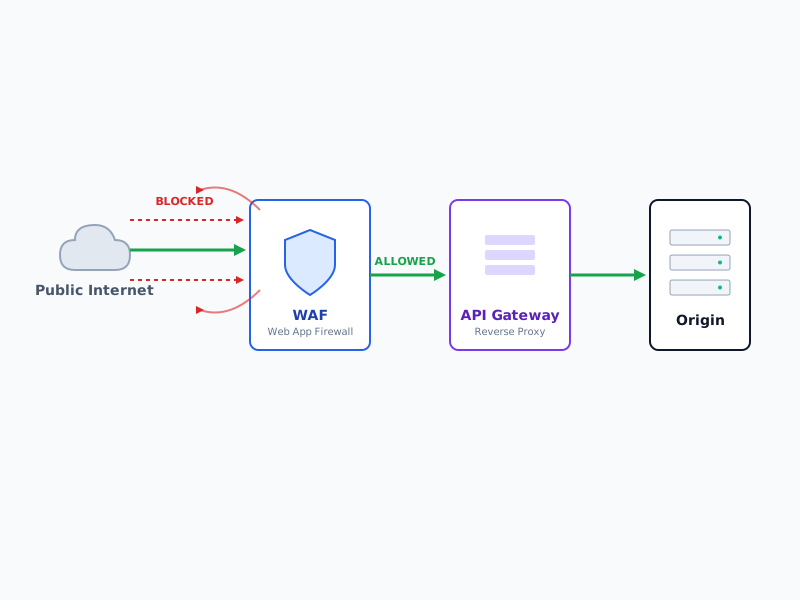 A secure architecture leverages a WAF to filter malicious traffic at the edge before it reaches internal services.
When configured correctly, this triad ensures a "default deny" posture. Here are the essential tests to prove it works.
Test 1: The Origin Bypass Test (Direct IP Access)
The Goal: Confirm that attackers cannot bypass your WAF and API gateway by sending requests directly to your backend server's IP address.
How to Test:
- Identify the public IP address or internal DNS name of your origin server (the server the reverse proxy routes to).
- Attempt to send a standard API request directly to that IP address, bypassing the gateway URL.
- Expected Result: The request should fail (e.g., a
403 Forbiddenor a network timeout).
Remediation: If the request succeeds, your origin server is exposed. Configure your origin server's firewall (like AWS Security Groups or iptables) to only accept ingress traffic from the specific IP ranges of your WAF/API Gateway.
Test 2: HTTP Method and Path Enforcement
The Goal: Ensure the API gateway rejects unauthorized HTTP methods and requests to undocumented endpoints.
How to Test:
Use a tool like curl or Postman to send requests that violate your API contract.
Method Fuzzing: Send a
TRACE,DELETE, orPUTrequest to an endpoint that should only acceptGET. bash curl -X TRACE https://api.yoursite.com/v1/usersPath Fuzzing: Request hidden or administrative paths that shouldn't be exposed externally (e.g.,
/admin,/.env,/server-status).
Expected Result: The gateway should immediately return a 405 Method Not Allowed or 403 Forbidden. It should not forward the request to the backend to figure out what to do.
Test 3: Schema and Payload Validation (WAF & Gateway)
The Goal: Verify that malformed payloads, oversized requests, and known attack signatures are dropped at the edge.
How to Test:
- Oversized Payloads: Send a JSON payload that exceeds your acceptable size limit (e.g., a 10MB JSON file to an endpoint expecting a 50KB profile update). The reverse proxy should drop this to prevent buffer overflows or DoS.
- Malformed JSON/XML: Send syntactically invalid JSON. The API gateway should reject it before the backend parser ever sees it.
- Malicious Signatures: Send a benign but obvious attack signature to trigger the WAF. bash curl "https://api.yoursite.com/v1/search?q=" curl "https://api.yoursite.com/v1/users?id=1' OR '1'='1"
Expected Result: The WAF should intercept the malicious signatures (often returning a 406 Not Acceptable or a custom WAF block page/JSON response). The gateway should reject the malformed or oversized payloads with 400 Bad Request or 413 Payload Too Large.
Test 4: Header and Authentication Enforcement
The Goal: Confirm that the API gateway strips internal headers and strictly enforces authentication before passing traffic backward.
How to Test:
Header Spoofing: Many reverse proxies use headers like
X-Forwarded-Foror custom internal headers (e.g.,X-Internal-User-Role: Admin) to communicate with the backend. Attempt to inject these headers from the outside. bash curl -H "X-Internal-User-Role: Admin" https://api.yoursite.com/v1/dataMissing/Invalid Auth: Send requests with expired JWTs, missing
Authorizationheaders, or invalid API keys.
Expected Result: The API gateway must strip or overwrite any externally supplied internal routing headers. Unauthorized requests must be blocked at the gateway level (401 Unauthorized) without waking up the origin server.
Test 5: Rate Limiting and Volumetric Controls
The Goal: Ensure your reverse proxy and API gateway restrict the volume of traffic a single client can send, mitigating brute-force and DDoS attacks.
How to Test: Use a load-testing tool like Apache JMeter, k6, or an automated script to flood a specific endpoint with requests exceeding your defined rate limit (e.g., 200 requests per second).
Expected Result: Once the threshold is breached, the gateway should start returning 429 Too Many Requests. The WAF might also temporarily ban the offending IP address.
Automating Your Perimeter Tests
Manual testing is great for initial validation, but configuration drift is inevitable. To maintain a strict "allowed traffic only" environment, integrate these tests into your CI/CD pipeline.
- Nuclei: Write custom YAML-based templates to continuously scan your endpoints for WAF bypasses.
- DAST Tools: Incorporate Dynamic Application Security Testing (DAST) tools like OWASP ZAP or Burp Suite Enterprise to automatically fuzz your API endpoints during deployment.
- Infrastructure as Code (IaC) Scanning: Use tools to scan your Terraform or AWS CloudFormation scripts to ensure WAFs are attached to all exposed API Gateways and that origin servers are locked down.
Conclusion
Your API gateway, reverse proxy, and WAF are the front doors to your application. But simply installing a lock isn't enough—you have to turn the handle to ensure it's actually locked. By routinely testing for origin bypasses, enforcing schema validation, and verifying rate limits, you transform your perimeter from a theoretical shield into a proven, impenetrable barrier.